Plain-English phases
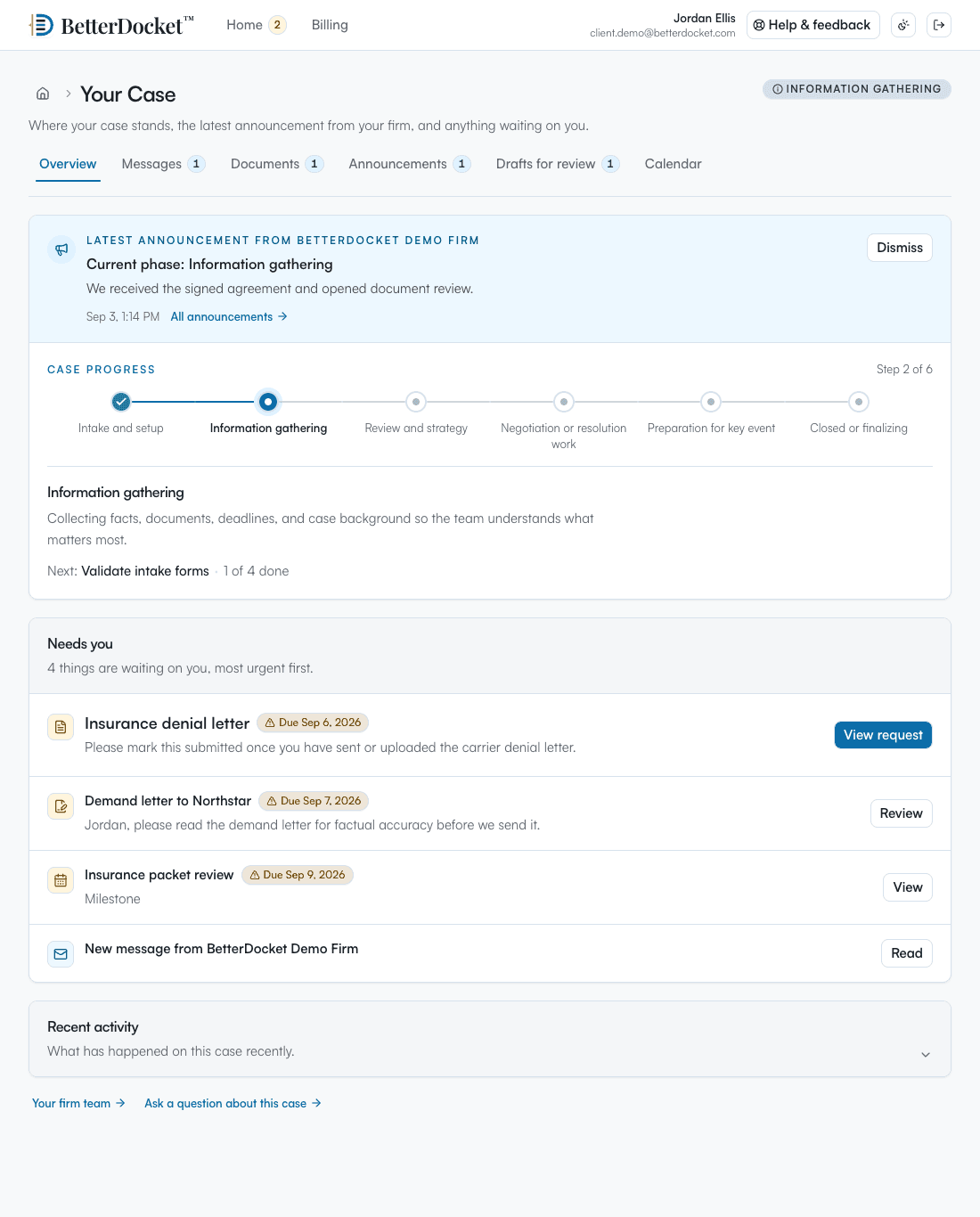
The client sees which phase the case is in, with your explanation of what that means and what happens next. The same tracker your team uses, so there is no separate client summary to maintain.
BetterDocket for civil litigation
Answer, discovery, motions, conferences, trial. The machinery of litigation means nothing to most clients. What they experience is a year of paying invoices while nothing visible happens, punctuated by requests for documents they thought they already sent. BetterDocket puts the procedure in plain English, the requests in one list, and the current court date where the client will find it.
The problem
Clients do not know what a motion to compel is or why the case management conference was continued. Without a plain-English explanation they can read at 9 p.m., they call the associate, who explains it again and bills for the call, which is its own problem.
Responding to document requests means getting records out of your client's hands: emails, contracts, statements, text threads. They arrive across a dozen email threads with attachments that bounce, and the paralegal rebuilds the list by hand.
Continuances and rescheduled conferences generate a round of calls every time. Missing one client in the round generates something worse. A business client with three stakeholders triples the problem.
How it runs
Stage by stage, from the first call to the closed file, each step is something the product does today.
Open a Prospect Case and request the contract, the demand letter, and the key correspondence before you decide to take it. The prospect uploads to a single documents page. Nothing bills until you accept.
See howYour template seeds Pleadings, Discovery, Motion practice, Mediation, Trial preparation, Resolution. Each phase has the Firm's tasks and a plain-English explanation in the portal of what it means and what happens next. Phases size themselves by the work behind them.
See howCreate a Document Request for each category you need to produce, with instructions and a due date. Uploads land on the Case organized by request, the Client can decline an item with a note, and daily reminders run on everything outstanding. Firm-only folders and tags organize the rest of the file.
See how“Discovery underway. Both sides have until the 30th to exchange documents; nothing is needed from you until then.” A templated Status Update posted once answers the question for every stakeholder on the Case.
Add the case management conference, the deposition, and the hearing as Key Dates and choose which the Client sees. When a date moves, change it once; every Client gets the new date rather than the old one. Clients share availability for depositions without any calendar integration.
Send a declaration or a settlement agreement as a numbered Draft Version. The Client approves, requests changes with a note or a marked-up copy, or flags that they want a call. Your working versions never appear in the portal.
Run one timer per member, keep Firm-only notes separate from the description the Client sees, and issue invoices with reminders from BetterDocket. Close the Case with a closing note at resolution; it archives automatically, and you can export a complete copy at any time.
See howClient Portal
One private page in any browser: the current phase in plain English, the latest word from your Firm, the documents you have asked for, and what happens next. No app to install. Uploads work from a phone camera. Firm-only folders, notes, and drafts in progress never appear here.
Your case
From your firm · today
Both sides exchange documents by the 30th. We are reviewing what Corden produced. Nothing is needed from you until the deposition is scheduled.
What we need from you
Next step
Deposition preparation is next. Share the days you are available in early November.
Why it fits
The client sees which phase the case is in, with your explanation of what that means and what happens next. The same tracker your team uses, so there is no separate client summary to maintain.
Request the categories you need through the matter, with due dates. Client uploads land in the Case, organized by request, with automatic reminders on everything still outstanding.
When a hearing moves, update the matter once. The team's related tasks, the draft under review, and the message thread stay attached to the Case.
Folders, tags, the Trash, internal notes on time entries, and draft versions in progress never appear in the portal. Clients see only the client-visible side of the Case.
Deliberately focused
BetterDocket organizes the administrative work around a matter. The legal work, and the tools you already use for it, stay where they are.
Keep reading
Post one visible status update per milestone in a place clients can check themselves — a portal — instead of returning each call. Here is the playbook.
Read the guideMake every request itemized, visible, and self-reminding: one list the client can see, uploads that land in the matter, and automatic follow-up.
Read the guideStop reconstructing priorities from inboxes. An attention queue built from four signals — unread, pending, stale, upcoming — tells you where to look.
Read the guideNo. It collects documents from your clients and keeps them organized on the matter, but e-discovery processing, review platforms, and production tooling are outside its deliberately narrow scope.
Yes. Clients see only the client-visible side of the Case: status, next steps, messages, requests, and documents shared with them. Internal folders, the Trash, and draft work in progress never appear in the portal.
Yes. Add each stakeholder as a Client on the Case. They all see the same status, requests, and dates, each with private messages, which beats reconstructing the case from an email thread before every board update they owe someone.
Each Firm Member can run one timer or enter time manually against the Case, with Firm rounding rules. Billable entries carry a separate client-facing description. Invoices combine time and manual lines, issue as a permanent PDF, and remind the bill-to Client on the due date.
Yes. Mark a Case restricted and only its assignees and Firm owners can see it. That is enforced in the database, not hidden in the interface.
Phases, requests, and court dates in one portal.
14 days. No card.