Know where to start
Today ranks the matters that need you and says why, so the morning does not begin with an inbox audit.
BetterDocket for solo lawyers
When you are the attorney, the paralegal, and the receptionist, every “any news?” call and every missing document comes out of the hours you meant to spend on the law. BetterDocket ranks what needs you, gives each Client a place to look instead of calling, and turns the follow-up into something that happens on its own.
The problem
Every status call, every “did you get my email?”, every request to resend the form lands on you, usually while you are in the middle of drafting. There is no one to hand it to.
Which client has not heard from you in three weeks? Which request is a week overdue? Which hearing is Thursday? The answer lives across an inbox, a calendar, and a legal pad, and rebuilding it every morning is unpaid work.
Practice-management suites charge per seat, take weeks to set up, and bundle trust accounting and document assembly you may never open. What you need is lighter than that and should cost less.
A day in BetterDocket
Every step is something the product does today, from the browser, the desktop app, or your phone.
Today is a scored queue of the Cases that need you, each with a plain-English reason: an unread Client message, a Document Request past due, a Client who has not heard from you in too long, a hearing this week. The lead card is the one thing to do first.
See howClient messages and uploaded documents are attached to the Case, not scattered across your inbox. Reply in the thread, mark the request received, and the reminder that was chasing it stops on its own.
See howPick a Status Update template, adjust a sentence, post it. It lands at the top of the Client's portal and in their updates feed. Stale-update detection tells you who is due for one before they call to ask.
Type “request the signed release from Jordan by Friday” and the copilot drafts the Document Request as an editable proposal. Nothing is created until you approve it. Tasks, reminders, messages, updates, and key dates work the same way.
See howStart a timer on the Case you are working. Switching to another Case stops the first one at the same instant. Keep Firm-only notes separate from the description the Client will see on the invoice.
See howBuild the invoice from time entries and manual lines, issue it as a permanent PDF, and let BetterDocket remind the Client on the due date. Record the payment when it arrives; BetterDocket never touches the money.
Cases you have opened stay readable offline. A message you send from the train delivers when you are back online. Your Notification Roundup arrives on the schedule you chose, grouped by Case.
Built for your firm
Today ranks the matters that need you and says why, so the morning does not begin with an inbox audit.
Describe the administrative action in a sentence, check the proposal, approve it. The copilot never acts on its own.
The same product in the browser, as a Mac or PC app, and on your phone. One account, live updates, supported offline reading.
$10 per month for the Firm plus $1 per open Case, prorated by day. No per-seat charge, every feature included, 14-day trial with no card.
Actual product
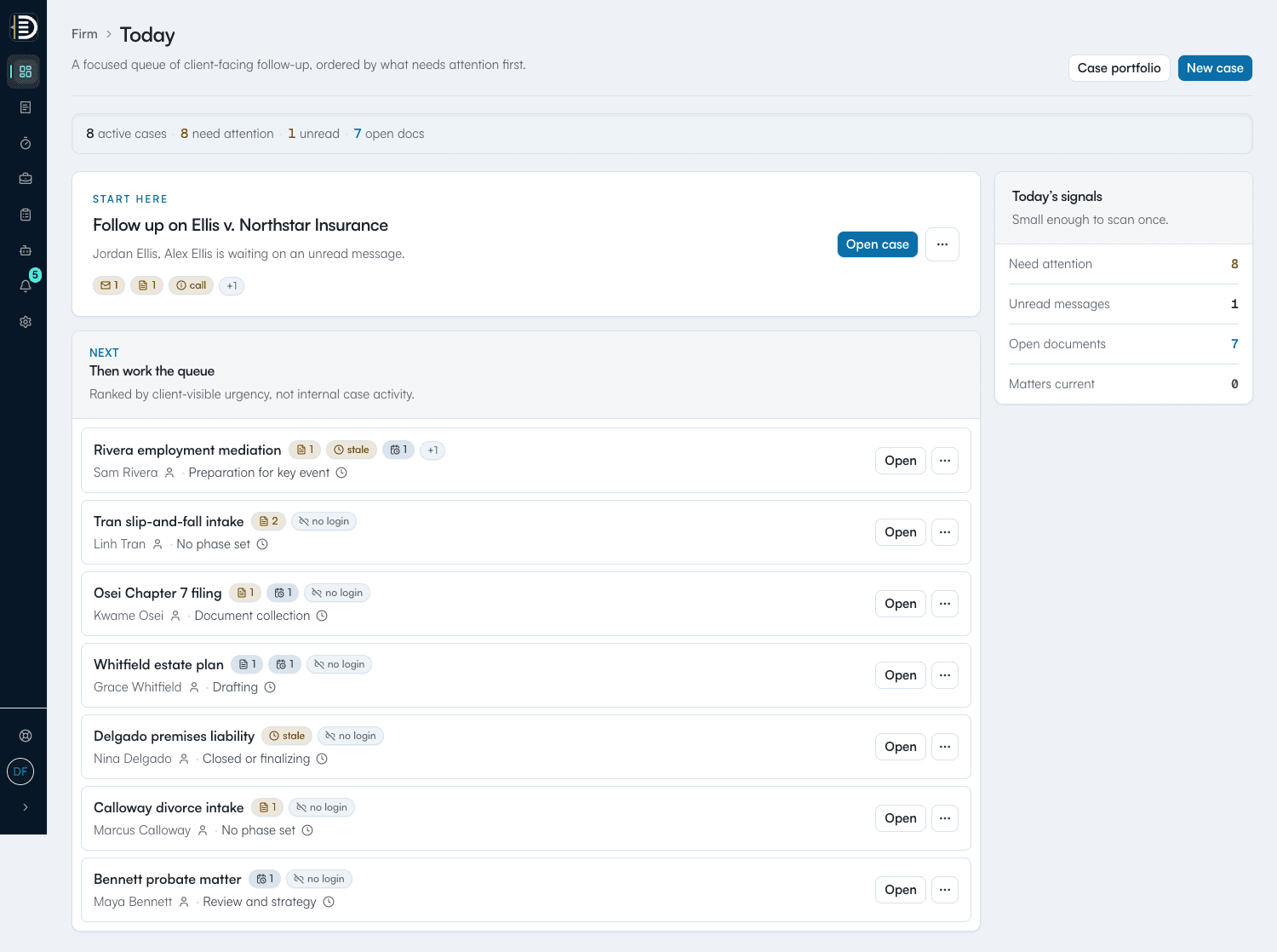
Every open Case ranked by what needs you, with the reason on each row.
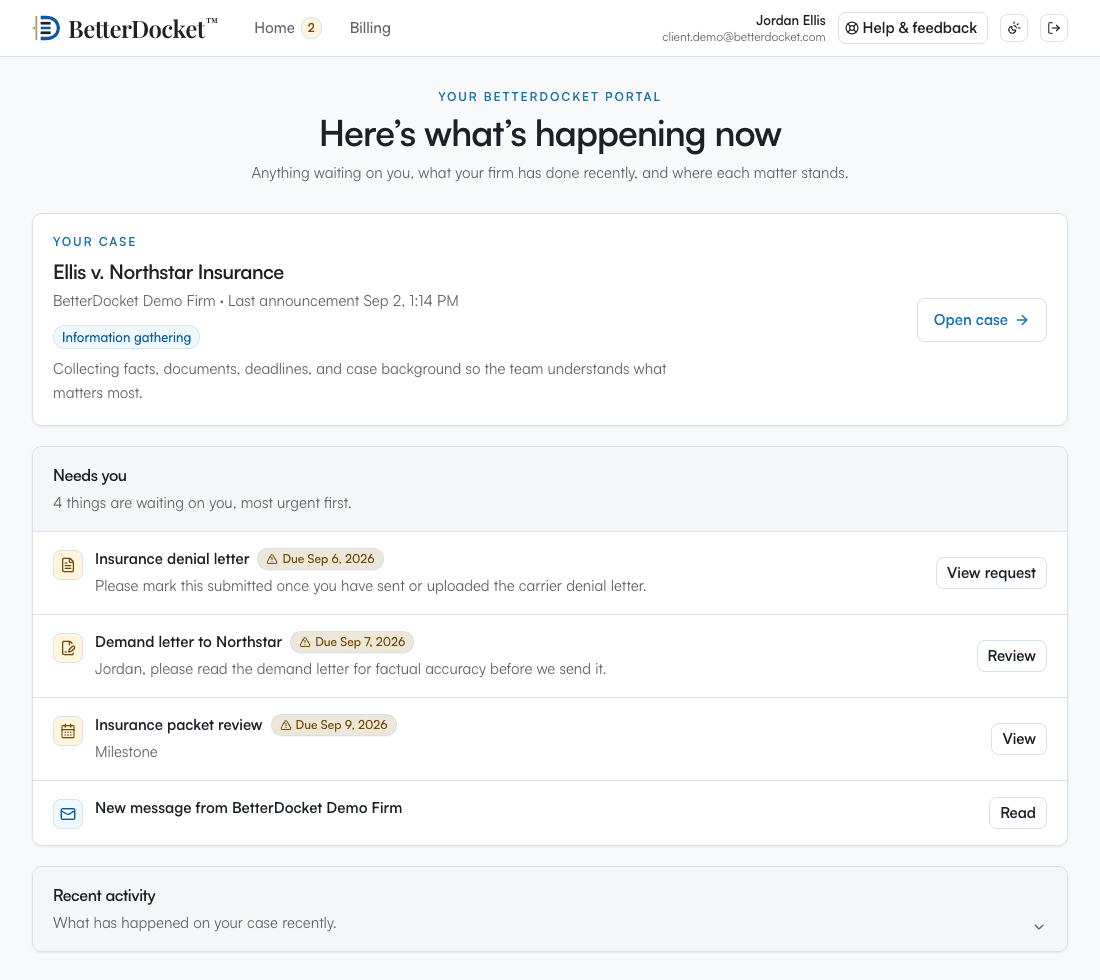
Status, next steps, requests, dates, messages, and invoices, without a phone call.
Deliberately focused
BetterDocket organizes the administrative work around a matter. The legal work, and the tools you already use for it, stay where they are.
Keep reading
Stop reconstructing priorities from inboxes. An attention queue built from four signals — unread, pending, stale, upcoming — tells you where to look.
Read the guidePost one visible status update per milestone in a place clients can check themselves — a portal — instead of returning each call. Here is the playbook.
Read the guideMake every request itemized, visible, and self-reminding: one list the client can see, uploads that land in the matter, and automatic follow-up.
Read the guideCreate the Firm, add a Case with a Client email, and the portal invitation goes out automatically. Templates seed phases and tasks. Most solos are running their first matter in an afternoon.
Yes, at no extra cost. There is no per-seat charge. Invite them from the dashboard, assign them to the Cases they help with, and they get their own queue and Notification Roundup.
No. It drafts an editable proposal: a task, a Document Request, a message, a Status Update, a key date. You edit, approve, or dismiss it. Nothing is created or sent until you approve.
$10 per month for the Firm plus $1 per open Case per month, prorated by day, with every feature included. Closed Cases archive automatically at a lower rate. The trial is 14 days with no card.
Export a complete copy of any Case at any time: every document, every draft version, and a full JSON record. It is your file, and it moves nothing and deletes nothing when you export it.
One queue for you. One portal for each client.
14 days. No card.