Clear Case status
Each matter shows its phase in plain English, the current status, and the latest Firm update at the top of the Client Portal. When a client wonders what is happening, the answer is already there, on the web or on their phone.
BetterDocket for family law
Family law clients are living inside their case. They call because the silence is unbearable, they send disclosure documents one photo at a time, and every rescheduled hearing turns into a round of phone calls. BetterDocket gives each Client one place to see where the matter stands, what is being asked of them, and what happens next, so your team can stop repeating the same answer and get back to the work.
The problem
Divorce and custody clients check in constantly because the case is their life right now. Every “just checking in” call interrupts real work, and the answer is usually the same as last week's: nothing has changed since the last filing, and the hearing is still on the calendar.
Tax returns, pay stubs, account statements, retirement summaries, property records. Financial disclosure means collecting dozens of documents from a stressed client, and they arrive across email threads, text messages, and paper drop-offs that someone has to reconcile against the list.
Mediation sessions, hearings, and exchange deadlines are hard enough when everyone knows about them. When a client hears about one late, or hears the old date after a continuance, the surprise becomes another long phone call and sometimes a missed appearance.
How it runs
Stage by stage, from the first call to the closed file, each step is something the product does today.
Before you take the matter, open a Prospect Case and request the handful of documents you need to evaluate it: the marriage certificate, any existing orders, a recent pay stub. The prospect sees only a documents page. Nothing bills until you accept the Case.
See howAccepting the Case seeds phases from your family-law template: Filing, Financial disclosure, Mediation, Hearing, Final judgment. Each phase carries the Firm's tasks and a plain-English explanation the Client can read in the portal.
See howCreate a Document Request for each item, with instructions and a due date. The Client uploads from a phone camera, marks “I don't have this” with a note when that is the truth, and BetterDocket sends a reminder every day until each request is answered. Open versus received stays obvious to both sides.
See how“Your financial affidavit was filed today. The other side has 30 days to respond; we will update you when it arrives.” One Status Update from a template, posted once, lands in the portal for every Client on the Case and stays in their updates feed.
Add the mediation session, the temporary-orders hearing, and the exchange deadline as Key Dates and choose which ones the Client sees. When a date moves, change it once. Clients can share availability blocks so you know when they can attend, without any calendar integration.
Send the marital settlement agreement as a numbered Draft Version for review. The Client approves, requests changes with a note or a marked-up copy, or flags that they would rather talk it through. Your working versions stay Firm-only until you send them.
Log time against the Case as you go, issue the invoice from BetterDocket, and record payments you receive elsewhere. When the final judgment is entered, close the Case with a closing note the Client sees; it archives automatically and stays readable to both of you.
See howClient Portal
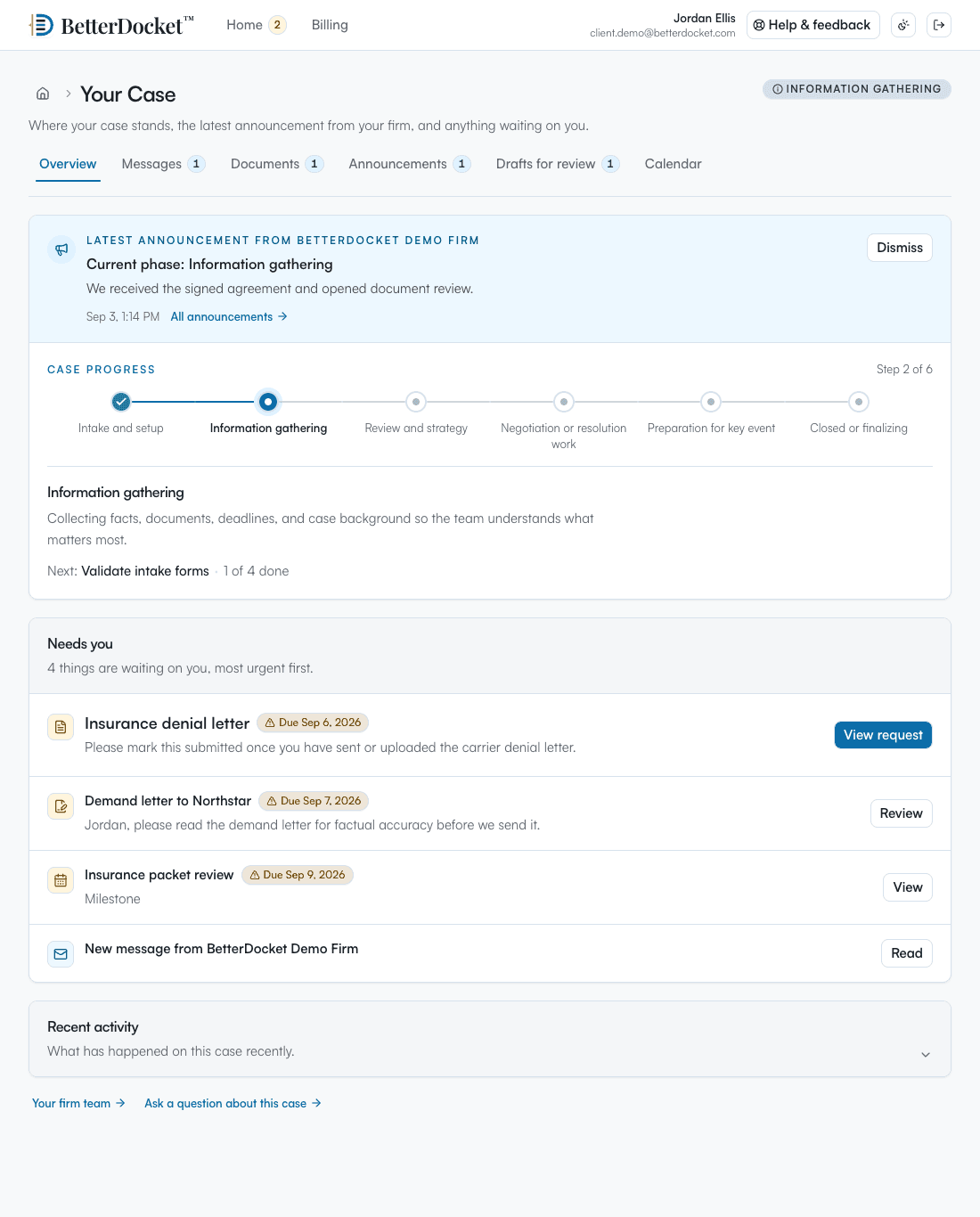
One private page in any browser: the current phase in plain English, the latest word from your Firm, the documents you have asked for, and what happens next. No app to install. Uploads work from a phone camera. Firm-only folders, notes, and drafts in progress never appear here.
Your case
From your firm · today
We filed your financial affidavit today. The other side has 30 days to respond; we will post an update as soon as it arrives.
What we need from you
Next step
Mediation is scheduled for October 14. Share the afternoons you are free.
Why it fits
Each matter shows its phase in plain English, the current status, and the latest Firm update at the top of the Client Portal. When a client wonders what is happening, the answer is already there, on the web or on their phone.
Every disclosure item is a Document Request with a due date. Uploads land on the Case organized by request rather than in a personal inbox, and the daily reminders do the chasing your paralegal used to do.
Hearings, mediation, and exchange deadlines stay attached to the matter with the Firm's related tasks. Clients see the dates intended for them; the team keeps the operating detail and the internal notes.
Your Today queue ranks the family matters that need you: an unread Client message, a disclosure request past due, a Client who has not heard from you in too long, a hearing coming up this week.
Deliberately focused
BetterDocket organizes the administrative work around a matter. The legal work, and the tools you already use for it, stay where they are.
Keep reading
Family law clients call because the case is their life and they can't see it. Visible status, plain-English phases, and milestone updates stop the loop.
Read the guideMake every request itemized, visible, and self-reminding: one list the client can see, uploads that land in the matter, and automatic follow-up.
Read the guidePost one visible status update per milestone in a place clients can check themselves — a portal — instead of returning each call. Here is the playbook.
Read the guideYes. Solo practitioners and small firms are exactly who it is built for. If your clients ask “any news?” a lot and disclosure documents arrive across five inboxes, BetterDocket replaces that churn with one portal and one attention queue, for $10 a month plus $1 per open Case.
Access is scoped per Client, per Case. Your Firm controls which Clients have portal access to a matter, each Client's messages and read state stay private from the others, and every read and write is authorization-checked at the database layer.
They open the request in the portal and upload from any browser, including a phone camera. Each file lands against the specific Document Request it answers. If a client emails the file anyway, you can drop it into the open request yourself.
Edit the Key Date once. Every Client on the Case sees the new date in the portal, and the Firm's related tasks stay attached to the matter. Post a one-line Status Update if you want the change to appear in the updates feed too.
No. BetterDocket connects the administrative work around a matter, meaning status, messages, document requests, next steps, and key dates, but it does not perform legal analysis or calculations of any kind.
Only if you add them. A Case can include multiple Clients, and your Firm decides who gets portal access. Everyone you invite sees the same client-visible status, updates, and requests for that matter.
Status, requests, and dates in one portal. Fewer calls for your team.
14 days. No card.